ePaper Displays
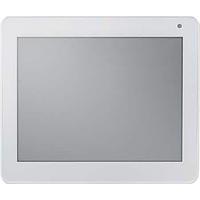
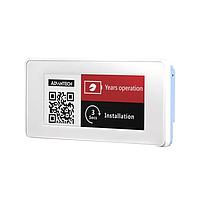
When a project needs a display that remains readable in ambient light, consumes very little power in static mode, and keeps information visible without continuous refresh, ePaper Displays are often the right place to start. They are widely used in embedded systems, smart labels, portable instruments, industrial interfaces, and connected signage where low power operation matters more than fast video-style rendering.
Unlike conventional screens that rely on constant backlighting, ePaper technology is designed for reflective viewing. That makes it attractive for applications where long battery life, clear text, and comfortable viewing are more important than high frame rates. For engineers comparing display technologies, it can also be useful to review alternatives such as LCD displays depending on refresh speed, color requirements, and integration constraints.
Why ePaper is used in low-power and always-visible designs
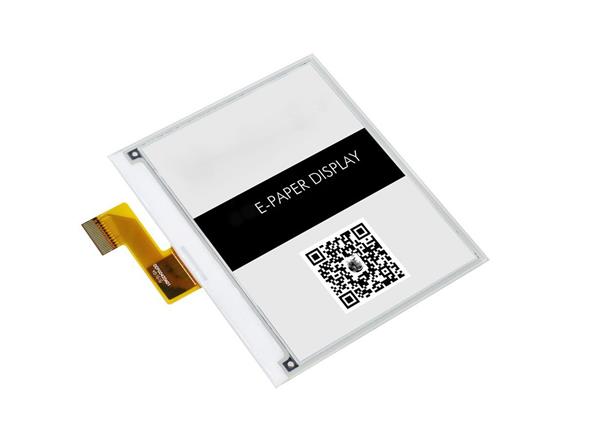
The main advantage of ePaper is its ability to hold an image with minimal energy once the content has been written. This makes it well suited to battery-powered products, portable devices, and systems that update data only periodically, such as shelf labels, room signs, measurement readouts, scheduling panels, and asset tags.
Another important benefit is high readability under ambient light. Because the display is reflective, it performs naturally in bright indoor environments and many daylight conditions. In practical terms, this means engineers can build interfaces focused on text, symbols, QR codes, status information, or simple graphics without depending on a continuously illuminated panel.
Common formats and application ranges
This category covers a wide range of panel sizes and use cases, from compact embedded modules to large-format electronic paper panels. Smaller options such as the Microtips Technology MT-DEPG0213BNS800F41 and the Pervasive Displays E2213CS0C3 are suitable for compact devices where space, low supply voltage, and simple serial integration are important. These types of displays are often considered for handheld equipment, smart sensors, compact HMIs, and identification systems.
At the other end of the range, larger modules such as the Pervasive Displays E2B98KS063, Pervasive Displays E2B98CS0B1, and Advantech EPD-132R2AG-NSD01 support use cases like signage, room management, logistics labeling, and wider information panels. Large ePaper formats are especially relevant when the displayed content changes occasionally but must remain visible for long periods with low operating power.
Monochrome and tri-color options
Not every application needs the same visual output. Many designs focus on black-and-white presentation for maximum simplicity and low-power status display. Examples in this category include compact monochrome modules from Microtips Technology and larger black-and-white panels from Pervasive Displays, which can be relevant for text-heavy layouts, barcodes, scheduling information, and industrial status indicators.
Where visual emphasis is needed, tri-color options can add another layer of usability. Products such as the Pervasive Displays E2370JS0C1, Pervasive Displays E2154JS0C1, and Adafruit 4868 show how black, white, and red combinations can support warnings, highlighted values, and simple UI hierarchy. In these cases, color is not about full multimedia output but about making critical information easier to distinguish.
Interfaces and integration considerations
Most ePaper modules are selected as part of a wider embedded electronics workflow, so interface choice matters. Several products in this category use SPI, while others may support I2C, serial, GPIO, UART, USB Type-C, WiFi, or Bluetooth depending on whether the item is a raw display module, a development-oriented board, or a more integrated display platform. The right choice depends on the host controller, update frequency, software stack, and whether the design is prototyping-oriented or intended for direct product integration.
If the display itself is only one part of the architecture, related components such as display controllers and drivers may also be relevant during system design. This is particularly true when engineers need to coordinate communication, waveform handling, memory management, or broader display subsystem integration across custom hardware.
Development boards versus display modules
Within this category, there is an important distinction between bare or near-bare display modules and more accessible development platforms. A module such as the Microtips Technology MT-DEPG0266RWS800F34 is typically considered from the perspective of embedded integration, mechanical fit, electrical compatibility, and controller support. These products are often chosen by design teams building a custom end device.
By contrast, development-focused items such as the Soldered 333308 Inkplate 4 TEMPERA with glass panel or the Soldered 333167 Inkplate 2 with enclosure can be useful for faster evaluation, proof-of-concept work, and software experimentation. They help shorten the path from concept to testing, especially when teams want to validate refresh behavior, connectivity, content format, and enclosure usability before committing to a custom design.
How to choose the right ePaper display
A practical selection process usually starts with the information being shown. If the display is mainly for static text or simple icons, a small monochrome panel may be enough. If the layout includes labels, warnings, or highlighted states, a tri-color version may make more sense. Screen size should be matched to viewing distance, amount of content, and the physical space available in the product.
It is also important to review resolution, operating voltage, interface type, and environmental range. Some projects prioritize compact size and low current draw, while others need a larger visible area or broader temperature tolerance. In addition, engineers should consider update behavior carefully: ePaper is ideal for intermittent refresh, but it is not usually the first choice for high-speed animation or continuously changing video-like content.
Where ePaper fits in the broader display ecosystem
ePaper is highly effective when the priority is ultra-low power visual communication, but it is only one part of the display landscape. LCD technology may be more suitable when the application requires faster refresh, richer interactive behavior, or more conventional graphical interfaces. Older technologies such as CRT displays are generally relevant only in legacy or specialized contexts, which highlights how application requirements shape the choice of display type.
For B2B buyers, OEM teams, and system integrators, the best decision usually comes from balancing display readability, power budget, mechanical size, color needs, and interface simplicity. That is why this category includes both compact modules and larger panel solutions from established suppliers such as Advantech, Adafruit, Microtips Technology, Pervasive Displays, and Soldered.
Choosing with confidence
A well-matched ePaper display can simplify power management, improve readability, and support reliable information presentation in embedded and industrial products. Whether the requirement is a compact serial-connected panel, a tri-color module for clearer status indication, or a larger electronic paper format for signage and labeling, the key is to align the display with the update pattern and operating environment of the final system.
Explore the available range with attention to size, interface, color capability, and integration level. That approach makes it easier to narrow down the right solution for prototypes, custom electronics, and scalable B2B deployments.
Get exclusive volume discounts, bulk pricing updates, and new product alerts delivered directly to your inbox.
By subscribing, you agree to our Terms of Service and Privacy Policy.
Direct access to our certified experts