
Wireless Accessories
Reliable wireless systems often depend on small supporting parts that make commissioning, configuration, storage, and day-to-day operation easier. In many development and industrial environments, these details matter just as much as the core radio module itself, especially when teams need repeatable setup, secure network addressing, and practical field maintenance.
Wireless Accessories in this category support RF and wireless development workflows with practical components used around the main device ecosystem. That can include configuration tools, memory media, remote-control elements, and other supporting hardware that helps engineers deploy, adjust, or manage wireless equipment more efficiently.
Why wireless accessories matter in real applications
Accessory components are often selected after the main wireless device, but they can have a direct impact on installation speed, configuration consistency, and serviceability. In industrial communication projects, a simple configuration stick or memory accessory can reduce manual setup work and help standardize how multiple nodes are deployed across a site.
These products are especially useful when a system needs fast configuration transfer, easy replacement in the field, or convenient operator interaction. For engineering teams working across prototypes, pilot lines, and full installations, the right accessory can help reduce setup errors and simplify long-term maintenance.
Typical accessory types in this category
This category includes several kinds of support products rather than one single device type. Some items are intended for wireless module configuration, while others are used for storage, evaluation, or user interaction around a wireless-enabled platform.
Examples from the current range include configuration accessories for Radioline wireless modules, such as the PHOENIX CONTACT 2702197 RAD-868-CONF-RF1 and the PHOENIX CONTACT 2902828 blank config stick for 900 MHz and 2.4 GHz environments. There are also compact storage-related items such as PHOENIX CONTACT 2701668 16GB CF and 2701669 32GB CF, as well as interface-oriented products like the Digital View 5590001XX-3 remote control unit and KIT 60106-3 OSD rotary kit.
PHOENIX CONTACT options for configuration and network setup
For users working with industrial wireless communication, PHOENIX CONTACT accessories in this category are relevant where network addressing and device configuration need to be handled in a structured way. Several listed items are designed for use with Radioline wireless modules and focus on saving or transferring individual configuration data.
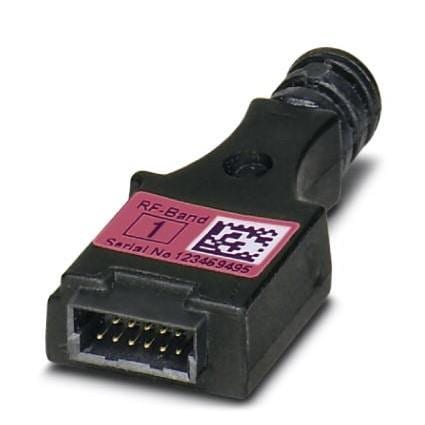
Products such as the PHOENIX CONTACT 2902814, 2902815, and 2902816 config sticks are intended for specific 2.4 GHz RF bands and support easy, secure network addressing. In practical terms, this type of accessory can be valuable when multiple wireless nodes must be prepared consistently, or when replacement devices need to be brought online without repeating every configuration step manually.
Digital View accessories for control and user interaction
Some wireless accessory needs are less about RF addressing and more about how a user interacts with the system. In that context, Digital View products in this category provide examples of support hardware connected to control and interface handling.
The Digital View 559000108-3 and 5590001XX-3 remote-related accessories, along with the KIT 60106-3 OSD ROTARY KIT 150MM, illustrate how accessory products can support operator input and adjustment functions. These kinds of items are useful when a display or embedded platform requires accessible local control rather than direct interaction through the main board alone.
How to choose the right wireless accessory
The first selection step is to match the accessory to the exact platform or module family in use. Compatibility is especially important for configuration media and memory-related accessories, because their role is usually tied to a defined wireless module, RF band, or equipment architecture rather than broad cross-platform use.
It is also helpful to check the intended function: configuration storage, network addressing, user control, or removable media support. A config stick makes sense when repeatability and secure rollout are priorities, while a control accessory may be more relevant for systems that need convenient operator access during commissioning or normal operation.
For teams working across broader RF design tasks, related categories such as multiprotocol development tools or Bluetooth development tools may also help when the project extends beyond accessories into core wireless evaluation and development hardware.
Common use cases in industrial and engineering environments
Wireless accessories are commonly used during bench testing, pilot deployment, field replacement, and maintenance preparation. In these situations, the goal is not to add a new wireless function by itself, but to support a smoother workflow around the devices already selected for the project.
In industrial automation, configuration accessories can help technicians clone or transfer settings across similar wireless nodes. In embedded display or control systems, remote and rotary interface accessories can make setup and local adjustment more practical. Across both cases, the accessory plays a supporting but important role in improving deployment efficiency and reducing avoidable setup friction.
What to review before ordering
Before purchasing, verify the device family, supported frequency context where stated, and whether the accessory is intended for evaluation, configuration transfer, storage, or operator control. Product names in this category often already indicate the intended role, so reviewing the application context is usually more valuable than comparing items only by form factor.
If your project also involves broader wireless design work, categories like antenna development tools can be relevant alongside accessories, especially when system performance depends on both the RF path and the supporting hardware used during setup and testing.
Supporting a more complete wireless workflow
Choosing the right accessory is often about making the entire wireless system easier to configure, operate, and maintain. Whether the need is a PHOENIX CONTACT config stick for Radioline-related setup tasks or a Digital View control accessory for user interaction, these products help bridge the gap between a working device and a workable deployment process.
Explore the available Wireless Accessories range with attention to compatibility, function, and workflow needs. A well-matched accessory can make integration cleaner, reduce repetitive configuration work, and support a more dependable wireless implementation over time.
Get exclusive volume discounts, bulk pricing updates, and new product alerts delivered directly to your inbox.
By subscribing, you agree to our Terms of Service and Privacy Policy.
Direct access to our certified experts